
L12-R Micro Linear Servos for RC & Arduino 100mm 210:1 6 volts
SKU: TH0136
Backorder₹7,444.62
₹6,309.00 (Ex. of GST)
SKU: TH0642
MG90S all metal aluminium micro servo motor known for quality and reliability with 1.8 kg/cm of torque.
| Qty | Price | Save |
|---|---|---|
| 4 - 9 | ₹165.27 | 6% |
| 10 - 24 | ₹161.75 | 8% |
Sold Out!
We will notify you when this item is back in stock. Please enter your email or mobile number.
The MG90S Micro Servo Motor known for its quality and reliability is an all metal gear servo motor operating on a wide voltage range of 4.8V to 6.6V DC, it offers torque of 1.8 kg/cm, ensuring enough torque in various applications. Its swift reaction speed (no load speed of 0.10 seconds / 60 degrees at 4.8V and 0.08 seconds / 60 degrees at 6.6V, makes it a preferred choice for many applications like Robots, Robotic Arms, RC plane, RC car etc.
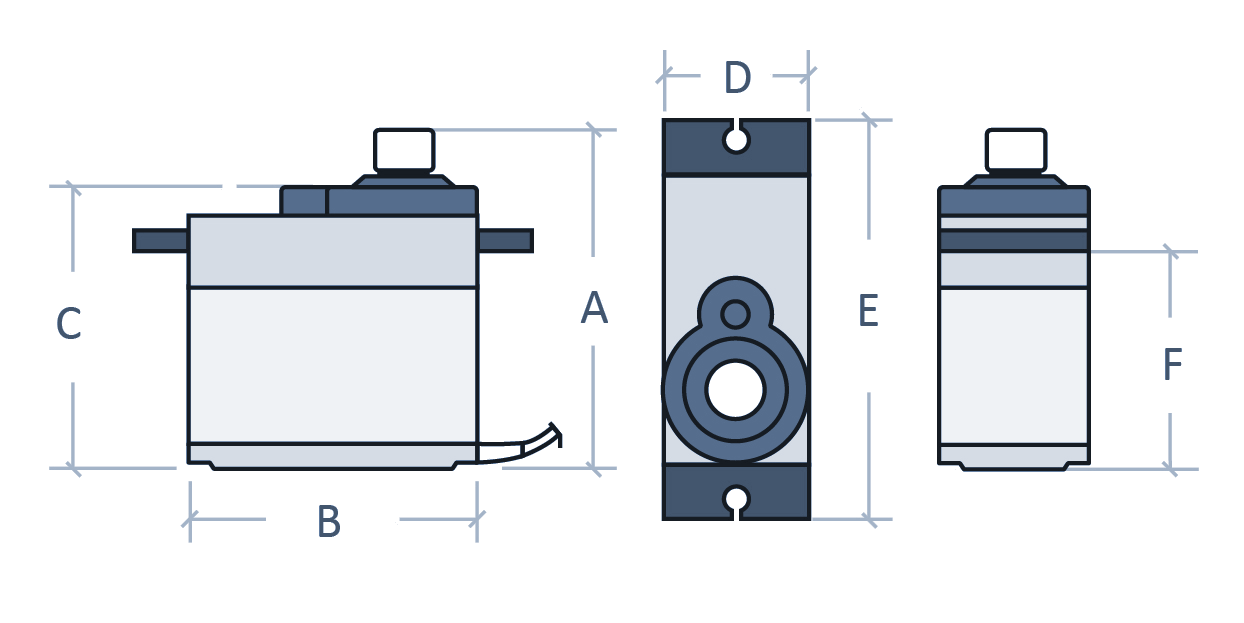
| A | B | C | D | E | F |
| 32.5 | 22.8 | 28.4 | 12.4 | 32.1 | 18.5 |
| Unit: Milimetre (mm) | |||||
| Voltage | 4.8V to 6.6V DC |
| Stall Torque | 1.8 kg/cm at 4.8V 2.2 kg/cm at 6.6V |
| Speed | 0.10 seconds / 60 degrees at 4.8V 0.08 seconds / 60 degrees at 6.0V |
| Gear Type | Metal Gears (Aluminium) |
| Cable Length | 25 cm |
| Plug / Connector | JR FUTABA Universal |
| Operating Temperature | 0°C to 55°C |
| Weight | 13.4g |
Servo motor pinout and wire color coding.
| No. | Pins | Color |
| 1 | Signal | Yellow |
| 2 | VCC | Red |
| 3 | GND | Brown |
Before we move into coding, first we need to install the Servo library written by Michael Margolis, Arduino in the Arduino IDE.
You can install this library by directly going to Tools > Manage Libraries which opens the Library Manager. In the library manager search for Servo using the search bar and click on the install button to install the latest version of the Servo library.
/* Sweep*/

#include <Servo.h>

Servo myservo;  // create servo object to control a servo
// twelve servo objects can be created on most boards

int pos = 0;    // variable to store the servo position

void setup() {
  myservo.attach(9);  // attaches the servo on pin 9 to the servo object
}

void loop() {
  for (pos = 0; pos <= 180; pos += 1) { // goes from 0 degrees to 180 degrees
    // in steps of 1 degree
    myservo.write(pos);              // tell servo to go to position in variable 'pos'
    delay(15);                       // waits 15 ms for the servo to reach the position
  }
  for (pos = 180; pos >= 0; pos -= 1) { // goes from 180 degrees to 0 degrees
    myservo.write(pos);              // tell servo to go to position in variable 'pos'
    delay(15);                       // waits 15 ms for the servo to reach the position
  }
}
Average rating
Based on 0 reviews
No reviews match this filter yet.
SKU: TH0136
BackorderSKU: TH0137
Backorder